Cart
0

The wrong part arrives. Now what?
You found what looked like the right part, added it to your cart, waited for delivery, and then spent twenty minutes trying to make it fit before accepting the obvious: it's not the right one. Return shipping, reordering, another wait. It's a frustrating loop that's almost entirely avoidable — and it almost always starts with skipping the compatibility check.
Most online auto parts shoppers treat the compatibility checker like a formality. It isn't. It's the single most useful tool on any parts site, and using it correctly takes about two minutes. Here's how to actually do it.
What a compatibility checker is actually doing
When you enter your vehicle details into a compatibility tool, you're not just filtering search results. You're cross-referencing your specific vehicle against a parts fitment database — a structured index that maps OEM part numbers, aftermarket replacements, and application guides to exact vehicle configurations.
That last word matters: configurations. Two trucks with the same year, make, and model can have completely different brake rotors, air filters, or sensors depending on their engine and trim. The compatibility checker accounts for that. A keyword search doesn't.
The five details you need before you start
Have these ready before you open the tool. Guessing on any one of them can send you down the wrong path.
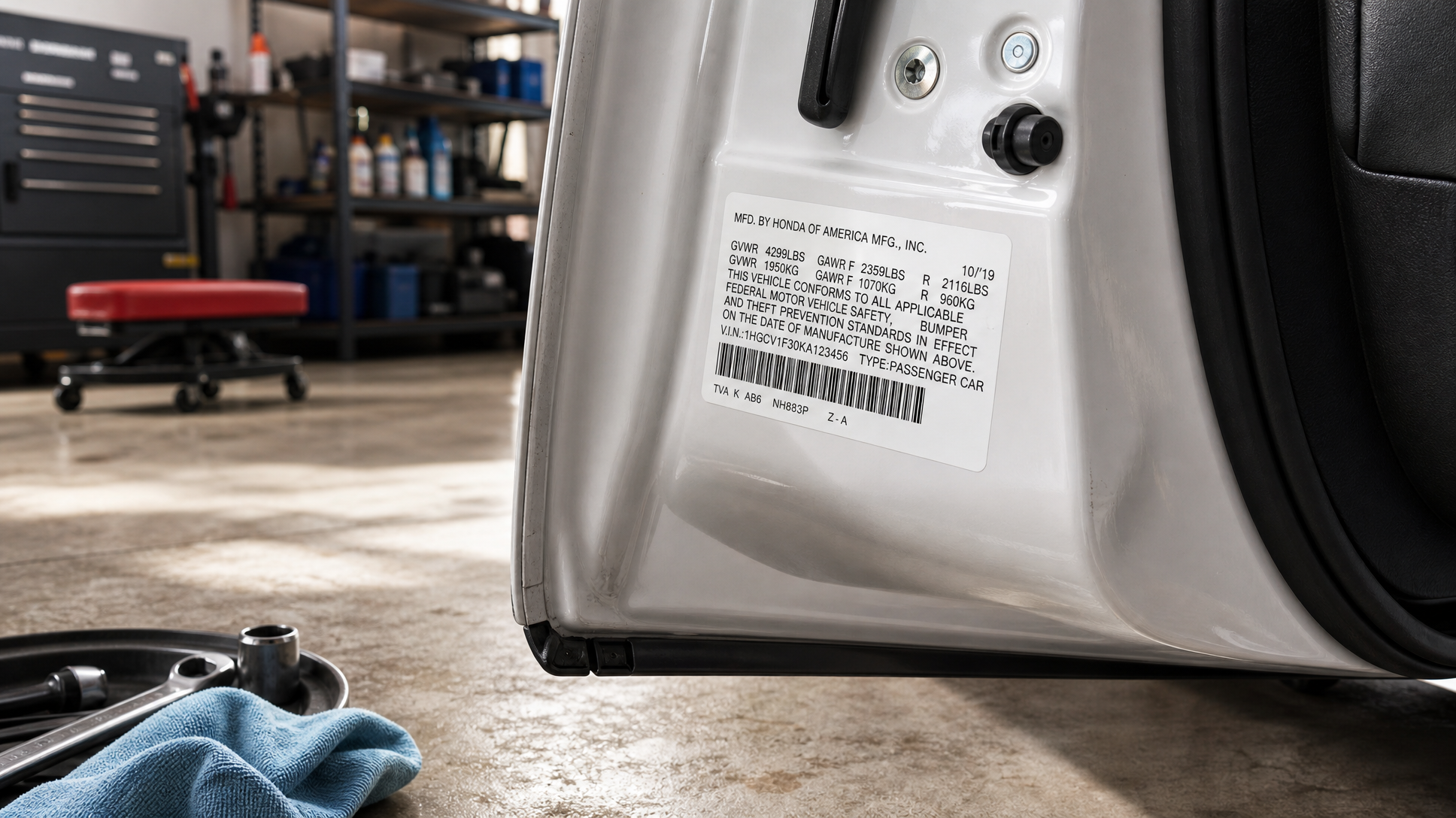
- Year — The model year, not the year you bought it. A car bought in late 2021 might be a 2022 model year. Check your registration or the driver-side door jamb sticker if you're not sure.
- Make — The manufacturer: Ford, Toyota, Honda, GM, and so on. Straightforward, but don't confuse a sub-brand (GMC vs. Chevrolet) — they matter for fitment.
- Model — F-150, Camry, Civic, Silverado. Be specific: a "Ford F-Series" isn't enough.
- Trim level — This is the one people skip most often. A base trim and a sport or sport utility trim on the same model year can have different suspension components, brake setups, or electrical systems. XL, XLT, Lariat, Limited — it matters.
- Engine code or displacement — A 2.5L four-cylinder and a 3.5L V6 in the same model year are not the same vehicle for parts purposes. If you don't know your engine code, it's printed on the emissions label under the hood or on the VIN sticker.
Your VIN (Vehicle Identification Number) encodes all of this. It's the 17-character code on your dashboard (visible through the windshield), your registration, and your insurance card. Some compatibility tools let you enter the VIN directly, which removes guesswork entirely.
How to actually use the checker — step by step
The process is short. The discipline is in not rushing it.
- Go to the catalog before you search for a specific part. Enter your year, make, model, trim, and engine first. Let the tool filter the catalog to your vehicle. Then browse or search within those results — not the other way around.
- Confirm the part number matches. Once you've found a listing, look for the OEM part number or cross-reference number and verify it against your owner's manual, a dealer parts lookup, or the old part you're replacing. A photo match isn't enough.
- Read the fitment notes. Reputable listings include application notes — things like "fits models with factory tow package" or "does not fit vehicles with sunroof." These aren't fine print. They're the difference between a correct order and a return.
- When in doubt, check the part you're replacing. Pull the old part, find the number stamped or printed on it, and search that directly. It's the most reliable shortcut available.
If you want a deeper look at how to navigate the full buying process for replacement parts online — including how to read listings and avoid common mismatches — the guide on how to buy replacement auto parts online without getting the wrong fit covers that ground well.
What "universal fit" actually means
"Universal fit" does not mean the part will fit your vehicle. It means the part is designed to work across a range of vehicles — but it almost always requires modification, custom mounting, or additional hardware to install correctly.
This comes up most often with accessories: floor mats, seat covers, steering wheel covers, certain lighting kits, and some performance parts. A universal floor mat may technically sit in your footwell, but it won't contour to your specific floor or secure properly without trimming or additional clips.
For any safety-critical component — brakes, suspension, steering, fuel system — do not rely on a universal-fit listing. Those parts need to be vehicle-specific. Full stop.
For accessories and cosmetic upgrades, universal fit can be fine, but go in knowing you may need to adapt the part on installation. Read the product description carefully for what's included and what isn't.
A few mistakes worth avoiding
Searching by part name alone. "Brake pads" returns thousands of results. "Brake pads for a 2019 Honda CR-V 1.5T EX" returns the ones that actually fit. Always filter first.
Assuming the same model year means the same part. Mid-cycle refreshes happen. Some manufacturers change suppliers or specifications mid-year. If a listing shows a fitment range of 2018–2022 but excludes certain build dates, that note exists for a reason.
Matching by photo. Parts look alike. A photo is useful for confirming shape and connector type after you've already confirmed the part number — not as a substitute for it.
Ignoring the engine displacement field. A V6 and a four-cylinder version of the same model often share zero drivetrain components. Skipping this field is how people end up with sensors, filters, and gaskets that look right but aren't.
Start your search the right way
Two minutes of entering your vehicle details correctly saves you a week of returns and reordering. Use Carkart's catalog to filter parts and accessories to your exact vehicle before you add anything to your cart — that's the whole trick. The right part is out there; the compatibility checker just makes sure it's the one that shows up at your door.
Frequently Asked Questions
What if I don't know my trim level?
Check the driver-side door jamb sticker — it usually lists the trim alongside the VIN and build date. Your vehicle registration or the original window sticker (if you have it) will also show the trim. If you're still unsure, entering your VIN into the compatibility tool will typically resolve it automatically, since the VIN encodes the trim configuration.
Is it safe to use a part that says it fits a range of years — for example, 2016–2022?
Generally yes, as long as your vehicle falls within that range and your trim and engine match. Read any fitment notes carefully — sometimes a range listing excludes specific sub-models or build dates. When in doubt, cross-reference the part number against the one you're replacing.
Can I use my VIN instead of entering year, make, model, and trim separately?
Yes, and it's often faster. The 17-character VIN encodes your vehicle's year, make, model, trim, engine, and assembly plant. Compatibility tools that accept VIN input decode all of that automatically, which removes the chance of selecting the wrong dropdown option. Your VIN is on your dashboard (visible through the windshield from outside), your registration, and your insurance documents.
What should I do if a part passes the compatibility check but still doesn't fit?
First, double-check that you entered the correct trim and engine — those two fields are the most common source of error. Then compare the part number on the item you received against the one stamped on the old part you removed. If the numbers match and it still doesn't fit, contact the retailer — there may be a listing error or a mid-year production change that the fitment database hasn't caught. Reputable retailers will work with you to resolve it.